Can Instagram Users See Who Viewed Their Profile? Complete Privacy Guide (2026)
Can people see who viewed their Instagram profile? Despite countless apps claiming to reveal profile visitors, the answer is simple. Here is what Instagram shows about views of your profile and content, what it does not, and why "profile viewer" apps cannot deliver.
The Direct Answer: Instagram Profile Viewing Privacy
No. Instagram has no feature that lists who viewed your profile, for personal, business, or creator accounts. What it does show: who viewed your Story (only you, for up to 48 hours), who liked or commented on a post, and counts in Insights such as reach or profile activity, never names.
Key Privacy Facts
- • Instagram has no feature that shows who viewed your profile
- • This applies to all account types (personal, business, creator)
- • Insights show counts, never the names of visitors
- • Stories are the exception: you can see who viewed yours for up to 48 hours
What You Can Actually Do Instead
Since no app can show you profile visitors, here is what actually works in 2026 depending on which side of the question you're on:
- If you want to know who is paying attention to your account: post Stories. The story viewer list is the place Instagram shows you individual names of people who watched your content, and only you can see it, for up to 48 hours.
- If you want aggregate numbers: check Insights. Instagram's Help Center says insights are available for public accounts, personal or professional. You get counts such as reach and profile activity — never individual names.
- If you want to watch someone WITHOUT appearing in their viewer list: that is the reverse problem — an anonymous story viewer fetches public stories without your own account being involved.
Want to browse someone's stories without your account showing up in their viewer list? Our free anonymous Instagram story viewer works with public accounts — no login and no app needed. And if you're curious how the viewer list itself is ordered, we look at the story viewer list here.
What Instagram Actually Shows About Your Account Activity
While Instagram keeps profile visits anonymous, it does show certain interactions and counts. Knowing what is visible helps you understand where the line is.
Visible Engagement Metrics
Instagram shows active interactions, but not passive viewing:
- Likes and Comments: You see who liked each post and who left comments
- Post Saves: Insights show how many times a post was saved, not who saved it
- Post Shares: Insights show share counts without telling you who shared
- Story Views: Only you can see who viewed your story, for up to 48 hours after posting
- Reel View Counts: Anyone can see the view counts on your Reels tab; professional accounts can choose to hide them
- Insights: Aggregate counts such as reach, views, and profile activity — never individual identities
In short, actions that people take on purpose liking, commenting, viewing a Story are attributed to them; passive browsing of a profile is not.
Instagram Insights: Counts, Not Names
Insights give you numbers about your audience and content, but even professional accounts don't get profile visitor identities.
| Metric Type | What You Can See | What Remains Hidden |
|---|---|---|
| Profile activity | Counts of visits and actions on your profile | Individual visitor names/accounts |
| Reach | Number of accounts reached | Which accounts saw the content |
| Views | Total views of your content | Who generated those views |
| Engagement | Likes, comments, shares, saves counts | Who saved or shared (you do see who liked and commented) |
| Story viewers | List of viewers, for up to 48 hours | Nothing during that window |
These numbers show what works, without revealing who visited your profile at 2 AM last Tuesday.
How to Find Your Profile Activity in Insights
Insights are available for public accounts, personal or professional. Roughly:
- Open the Instagram app and go to your profile
- Open Insights (on professional accounts it sits in the professional dashboard)
- Look at the overview and the profile activity numbers for the selected time range
- Open a single post and view its insights to see activity on that post
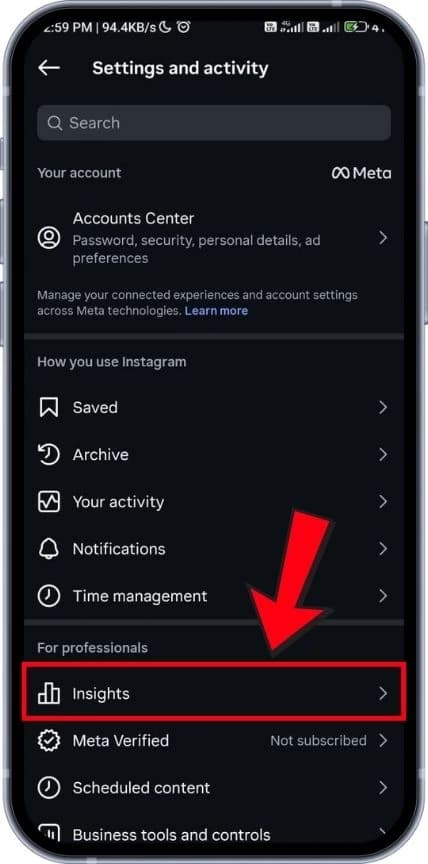
Insights in the account menu; the exact layout varies by app version
Remember, these statistics are counts only how many visits or actions occurred never who those visitors were.
Instagram Stories: The Exception
Stories are the one place Instagram shows who viewed your content: only you can see the list, for up to 48 hours after posting.
How Story Viewer Lists Work
What to know about story viewers:
- Only You See It: Other people cannot see who viewed your story; only the account that posted it can
- Time Window: The viewer list is available for up to 48 hours after posting, even though the story itself disappears after 24 hours
- Not a Profile Visitor List: The viewer list shows who watched the story, not who visited your profile
It works both ways: people know you can see they watched, which makes story viewing different from anonymous profile browsing.
Can People See Who Viewed Their Posts or Reels?
No. Instagram shows counts for posts and Reels, but not a list of people who viewed them without interacting.
What's Visible vs. Hidden for Posts and Reels
You can watch someone's Reels or scroll their whole feed without the creator seeing your name. For creators, interactions are the signals you can read: high views with low engagement mean content is found but not resonating.
| Content Type | Visible Information | Hidden Information |
|---|---|---|
| Feed Posts | Who liked and commented | Who viewed without engaging |
| Reels | View count (visible on your Reels tab unless hidden), likes, comments | Individual viewer identities |
| Carousel Posts | Who liked and commented; save and share counts in Insights | Who saved, shared, or viewed without engaging |
Business and Creator Accounts: More Numbers, Still No Names
Many users wonder if business or creator accounts unlock the ability to see profile visitors. They don't account type doesn't change what Instagram shows about individual visitors.
What Professional Accounts Get
Professional accounts get a professional dashboard and aggregate insights, still without individual visitor identities:
- Profile Activity: counts of visits and actions on your profile over a chosen time range
- Audience Insights: aggregate information such as age ranges, locations, and when followers are most active
- Content Performance: which posts, stories, and Reels reached and engaged the most people
- Reel View Count Control: the option to hide view counts on your Reels tab
A business might learn that profile visits rise after educational Reels, and plan content around that, without knowing who visited.
The Truth About Third-Party Profile Viewer Apps
Countless apps and websites claim they can reveal who viewed your Instagram profile. They cannot deliver that, and some of them put your account at risk.
Why Third-Party Viewer Apps Don't Work
Third-party apps claiming to show profile viewers have no source for that information:
- Instagram Does Not Show It: Instagram does not show profile visitors to account owners, so there is nothing for an app to read
- Invented Lists: Apps that show a "visitor list" have to fill it with something else, such as recent followers, accounts you interact with, or random accounts
- Against the Rules: Instagram's Terms of Use prohibit accessing or collecting information in an automated way without Instagram's permission, and collecting other people's login credentials
Risks of Using Profile Viewer Apps
Beyond not working, these apps can cause real problems:
- Account Compromise: Many "viewer apps" ask for your Instagram login, which gives whoever runs them access to your account
- Account Restrictions: Instagram's Help Center lists giving your username and password to a third-party app as one possible reason for restrictions on your account
- Data Exposure: An app with your login can see your messages, saved posts, and other private information
- Unwanted Charges: Some apps charge subscription fees for a feature that cannot exist
- Malware: Apps from outside the official app stores can carry malware that affects more than Instagram
The simple rule: don't trust any app, website, or service claiming to show who viewed your Instagram profile, and never give one your password.
Common Myths About Instagram Profile Viewing
Misinformation about Instagram viewing privacy spreads quickly. Here are the most persistent myths.
Myth #1: Business Accounts Can See Who Viewed Profiles
Reality: Business and creator accounts see counts in Insights, never individual visitor identities. The analytics show how many, not who.
Myth #2: Story Viewer Order Reveals Profile Visitors
Reality: The story viewer list shows who watched that story. It contains no information about who visited your profile, so its order can't tell you that either.
Myth #3: Story Highlights Show Profile Visitors
Reality: Highlights are stories you saved to your profile. Like any story, they don't produce a list of profile visitors.
Myth #4: Private Accounts Have Different Viewing Privacy
Reality: A private account controls who can see your content (only approved followers), but it doesn't add a visitor list. Whether your account is public or private, you can't see who viewed your profile you only control who is able to view it.
Myth #5: Instagram Notifies Users About Repeated Profile Visits
Reality: Instagram has no notification for profile visits, however often they happen. The viewing information Instagram shows is the story viewer list.
Why Profile Viewing Stays Private
Instagram does not explain its reasons in the Help Center, but showing profile visitors would raise obvious problems:
- Stalking and Harassment: Visitor lists could be used to confront or harass people over a visit
- Relationship Complications: Visitor lists could create awkward situations in personal and professional relationships
- Anxiety: Watching a visitor list could encourage obsessive checking
- Less Exploration: People might browse new accounts less freely if every visit were visible
How to Protect Your Instagram Privacy
While Instagram doesn't show who viewed your profile, you can control what others see about you. Menu names change between app versions, so look for these settings in Settings and privacy:
Essential Privacy Settings to Enable
- Account Privacy: Switch to a private account so only approved followers can see your posts and stories.
- Hide Story From: Choose specific people who cannot see your stories.
- Activity Status: Turn it off to stop others from seeing when you were last active.
- Comments: Limit who can comment on your posts.
- Messages and Story Replies: Control who can message you directly and whose messages go to requests.
- Tags and Mentions: Review tags before they appear on your profile, and control who can tag or mention you.
Privacy Best Practices
Beyond settings, a few habits protect your privacy:
- Think Before You Engage: Likes, comments, and follows are visible to others. If you want to browse quietly, avoid these interactions.
- Use Close Friends: Share sensitive stories with your Close Friends list rather than all followers.
- Review Followers: Periodically remove followers you don't recognize or trust, especially on a private account.
- Never Share Login Credentials: Don't give your Instagram password to apps that promise visitor lists or free followers.
- Review Tagged Photos: Remove tags from content you don't want associated with your profile.
- Control Personal Information: Keep personal details in your bio to a minimum and think before sharing your location in real time.
- Remember Stories Are Visible: If you don't want someone to know you watched their story, don't view it from your account.
Understanding Instagram's Broader Data Practices
Profile viewing privacy is only one part of how Instagram handles data. Meta's Privacy Policy describes what it collects, including:
- Your activity: the content you create and the likes, comments, follows, and searches you make
- Content you view and how you interact with it
- Device information, such as device type and IP address
- Location information, depending on your settings
- Information from partners about your activity outside Meta products
Meta uses this data to personalize your experience, show ads, and improve its products. Profile visits are part of your activity on Instagram even though no other user can see them. You can download a copy of your information with the "Download your information" tool in Accounts Center.
The Bottom Line
Instagram has no feature that shows users who viewed their profiles, for any account type. Profile viewing stays anonymous, while deliberate actions (likes, comments, story views) are visible to the account owner. Stories are the exception: the poster can see who viewed a story for up to 48 hours. Insights add counts, never names. Any third-party app promising a visitor list cannot get that information from Instagram. Protect yourself by avoiding those apps, never sharing your password, and using Instagram's privacy settings to control what you share.
⚠️ Warning About Viewer Apps
Avoid third-party apps claiming to show Instagram profile viewers. These apps:
- • Cannot get visitor data, because Instagram doesn't show it
- • Have to invent the lists they display
- • Often ask for your Instagram password
- • Can lead to restrictions on your account
Troubleshooting & FAQs
Can you see who views your Instagram profile?
No. Instagram has no feature that shows who views your profile, for personal, business, or creator accounts. The viewer list Instagram does offer is for Stories: only you can see who viewed your story, for up to 48 hours. Profile visits, post views, and Reel watches are not attributed to individual people. Apps that promise a visitor list cannot get that information from Instagram.
How can I see who stalks my Instagram?
You can't. Instagram does not show who views or repeatedly views your profile. What you can see is who likes or comments on your posts and who viewed your stories (for up to 48 hours). Insights add counts such as profile activity, never individual names. Any app claiming to reveal "stalkers" is making it up, and giving it your password can get your account restricted.
Does Instagram notify users when someone views their profile repeatedly?
No. Instagram has no notification for profile visits, however many times someone visits. The viewing information Instagram shows is the story viewer list: when you watch someone's story, they can see your username in their viewer list for up to 48 hours.
Can someone see that I viewed their Instagram profile, posts, or Reels?
No, with one exception. Profile visits, post views, and Reel views are not shown with your name unless you interact (like, comment, share with them). The exception is Stories: when you watch someone's story, they can see your username in their viewer list for up to 48 hours.
Do business or creator accounts show who viewed the profile?
No. Business and creator accounts see counts in Insights, such as profile activity and reach, plus aggregate audience information, but never individual visitor identities. Instagram's Help Center says insights are available for public accounts, personal or professional.
Can I browse Instagram anonymously without anyone knowing?
Yes, as long as you don't interact. Viewing someone's profile, scrolling through their posts, and watching their Reels doesn't show them your name. What does reveal you: watching their Stories (you appear in the viewer list), liking or commenting, following their account, or messaging them.
Why do third-party viewer apps show names if they don't really work?
Because they have to show something. Instagram doesn't show profile visitors to account owners, so an app that displays a visitor list has to fill it with other accounts, such as recent followers, people you interact with, or random accounts. Some of these apps also ask for your Instagram login, which puts your account at risk; Instagram's Terms of Use prohibit collecting other people's login credentials.
Who visits your Instagram profile — can you find out in 2026?
No. In 2026, Instagram still has no feature that reveals who visits your profile. Whether you have a personal, business, or creator account, Insights give counts such as profile activity, never individual names, and no third-party app can get the names from Instagram. The signals you do get come from Stories (viewer list, visible to you for up to 48 hours) and direct engagement like likes and comments.
Does Instagram show who viewed your profile in 2026?
No. Instagram does not show who viewed your profile in 2026. Insights show counts, but no account type — personal, business, or creator — can see individual visitor names. Any website or app claiming to provide a profile visitor list in 2026 is making the data up.
Can someone see if I viewed their Instagram story in 2026?
Yes — stories are the exception. When you watch someone's Instagram story, your username appears in their viewer list, which only they can see, for up to 48 hours after they posted it. There is no official way to watch a story without appearing in the list; anonymous story viewers work by fetching public stories without your own account, which comes with terms-of-service and security considerations.
Real-World Privacy Scenarios
How this works in practical situations:
Scenario 1: Job Hunting and Professional Browsing
You're job hunting and want to look at a potential employer's Instagram account without revealing your interest. You can browse their profile, view their posts, and watch their Reels without them seeing your name. Be careful with Stories: if you watch them, your username appears in their viewer list. And if you accidentally double-tap a photo, you've liked it, and they'll see that.
Scenario 2: Checking an Ex's Profile
Perhaps the most common question: can your ex see you've been viewing their profile? Not unless you interact. They can't see a list of profile visitors or get notified about your visits. The risks come from accidental engagement: liking an old photo, commenting, or watching their stories. Stories are the most likely giveaway, because your view shows up in their viewer list.
Scenario 3: Competitive Business Research
Business owners often look at competitors' Instagram strategies. You can view competitor profiles and study their content without them seeing your name profile visits are not attributed to individual accounts, whatever your account type. Watching their stories, though, puts your account in their viewer list.
Does Instagram Show Who Viewed Your Profile in 2026?
No Instagram does not show users who viewed their profile in 2026. When someone visits your profile, you get no notification, no name, and no list. The same applies when you visit someone else's profile. Here is a breakdown of what Instagram does and does not show in 2026: • What you CAN see: who viewed your stories (only you, for up to 48 hours), who liked and commented on your posts, view counts on Reels, and counts such as reach and profile activity in Insights. • What you CANNOT see: who visited your profile, who viewed your feed posts without interacting, who watched your Reels without interacting, or how many times a specific person watched your Reel. The closest thing is the story viewer list and it only shows people who watched the story, not people who browsed your profile.
Sources (Instagram Help Center and Terms of Use, checked October 2026):
✅ Instagram Viewing Privacy Checklist
- • Instagram has no feature that shows who viewed a profile
- • Stories are the exception: the poster sees viewers for up to 48 hours
- • Insights show counts, never visitor identities
- • Avoid third-party apps claiming to show profile viewers
- • Use privacy settings to control what others see about you
- • Avoid liking, commenting, or watching stories if you want to stay unnoticed
- • Make your account private to control who can view your content
- • Turn off activity status to hide when you're online
Auto Like Instagram Posts to Get Seen
Get noticed by potential followers and grow your account on autopilot
Save 7-16 hours every week
Related Articles

Instagram story viewers list 2026 explained: what the order means, whether rewatching moves someone up, how long it stays visible, and why viewers vanish.
See everyone you follow on Instagram who doesn't follow you back. Free, read-only Chrome extension that uses your own session and sends nothing to us.
How the Instagram Stories algorithm decides whose Stories you see first, from Instagram's own explanation, plus practical tactics and why views drop.